
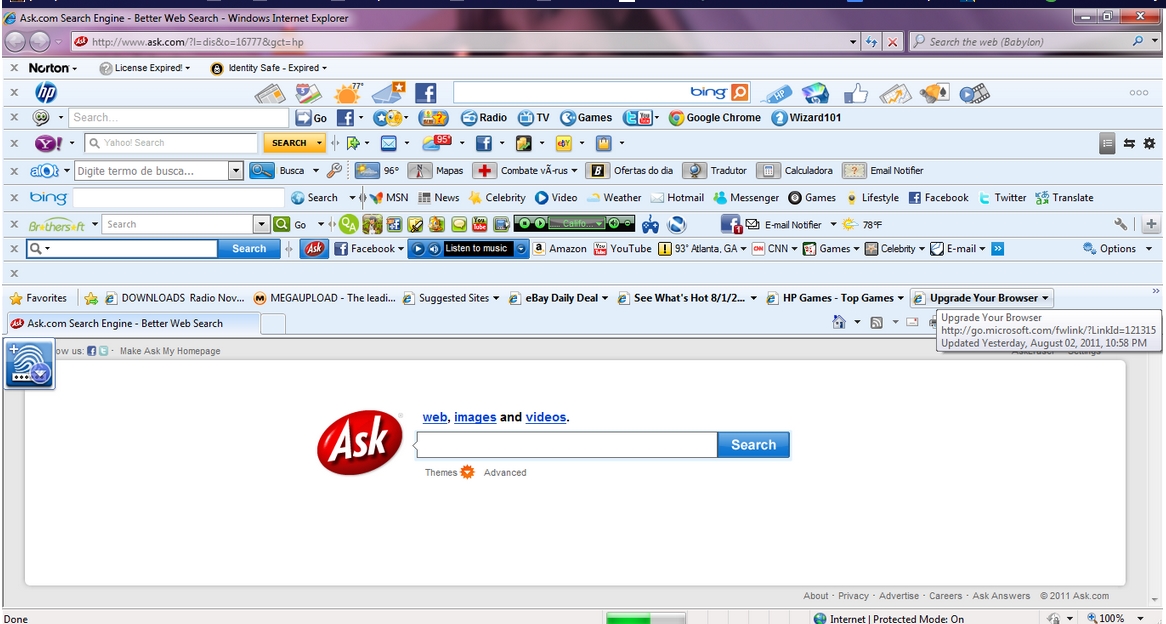
When you start your browser you notice a new toolbar that you do not recognize. There are some well known toolbars such as Google, Bing, and Avg that many people use. However, some toolbars are actually spyware and report on your browsing habits.
How do you get rid of these toolbars?
1. Many toolbars will have a drop down menu that you can click on. From here there may be an uninstall menu item.
2. For some toolbars you may be able to go to “Options” to uninstall.
However some toolbars like the one below may not give you that option.

So what else can you do?
The Efficacy of Install Monitor in Removing Unwanted Tool Bars
Another thing you can do is look in the programs list of Install Monitor. You may be able to figure it out from looking at the names and dates of the programs. The Find Window tool ( ) in Mirekusoft Install Monitor can be a useful toolbar remover. It will identify the program in the program list when you drag the mouse over the toolbar. This technique actually works for other windows as well and not just toolbars.
Once you have identified the program you can use program tree to find out how it got installed. In many cases simply forgetting to remove a checkbox can result in unwanted toolbars. From here you can use Install Monitor to remove the toolbar and any other unwanted programs that were installed at the same time.
 |
| The Find Window Tool makes it easy to remove unwanted toolbars like the Babylon Toolbar. |
 |
| The instructions for the Find Window Tool |
Related Posts

- Slower PC while FB gaming? Here’s the solution!
- How to identify unknown programs using the Program Tree
- How to Identify Unknown Programs with the Program Tree
- Cyber Criminals to Create Havoc also in Television, Is This for Real?





Hey Joe,
I just found out but Install Monitor and wanted to tell you that there are plenty of people really grateful for the work you do. Thanks